> ## Documentation Index
> Fetch the complete documentation index at: https://pinout.mintlify.site/llms.txt
> Use this file to discover all available pages before exploring further.
# SevenSegmentDisplay
The `SevenSegmentDisplay` driver is used to drive a single seven segment display module.
## Where to buy
[https://www.aliexpress.com/item/1005001616709100.html](https://www.aliexpress.com/item/1005001616709100.html)
## How to wire
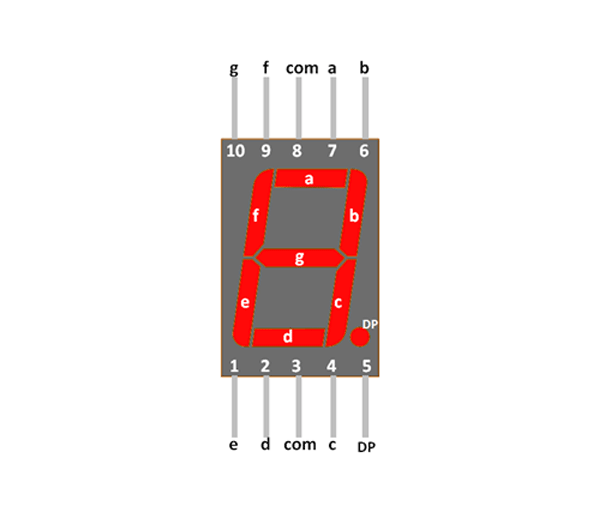
The module has 10 pins. 7 of them are for each segment of the display module. One is for the decimal point, and two are common ground.
Each pin should be connected to a [valid GPIO pin](https://pinout.xyz), and you should put a 330 ohm resistor between each LED. This means you will have 8 LEDs.
You can't just place a single resistor for all the LEDs. If you do this, you'll get varying brightness depending on how many segments are illuminated.
 ## Using the driver
Instantiate the driver using the static `make()` function, passing a reference to each pin.
```php theme={null}
use DanJohnson95\Pinout\Facades\PinService;
use DanJohnson95\Pinout\Drivers\SevenSegmentDisplay;
$driver = SevenSegmentDisplay::make(
pinA: PinService::pin(13),
pinB: PinService::pin(14),
pinC: PinService::pin(15),
pinD: PinService::pin(16),
pinE: PinService::pin(17),
pinF: PinService::pin(18),
pinG: PinService::pin(19),
pinDP: PinService::pin(20)
);
```
You can call the following methods on the driver:
### Available methods
#### `renderInteger`
#### `showDecimalPoint`
#### `hideDecimalPoint`
#### `clearDisplay`
## Using the driver
Instantiate the driver using the static `make()` function, passing a reference to each pin.
```php theme={null}
use DanJohnson95\Pinout\Facades\PinService;
use DanJohnson95\Pinout\Drivers\SevenSegmentDisplay;
$driver = SevenSegmentDisplay::make(
pinA: PinService::pin(13),
pinB: PinService::pin(14),
pinC: PinService::pin(15),
pinD: PinService::pin(16),
pinE: PinService::pin(17),
pinF: PinService::pin(18),
pinG: PinService::pin(19),
pinDP: PinService::pin(20)
);
```
You can call the following methods on the driver:
### Available methods
#### `renderInteger`
#### `showDecimalPoint`
#### `hideDecimalPoint`
#### `clearDisplay`